 Completed
Auto Emailer
Nonprofit
AutomationEmail
Send a personal email to your whole list in a few clicks. Write it once, and each person gets their own name and details.
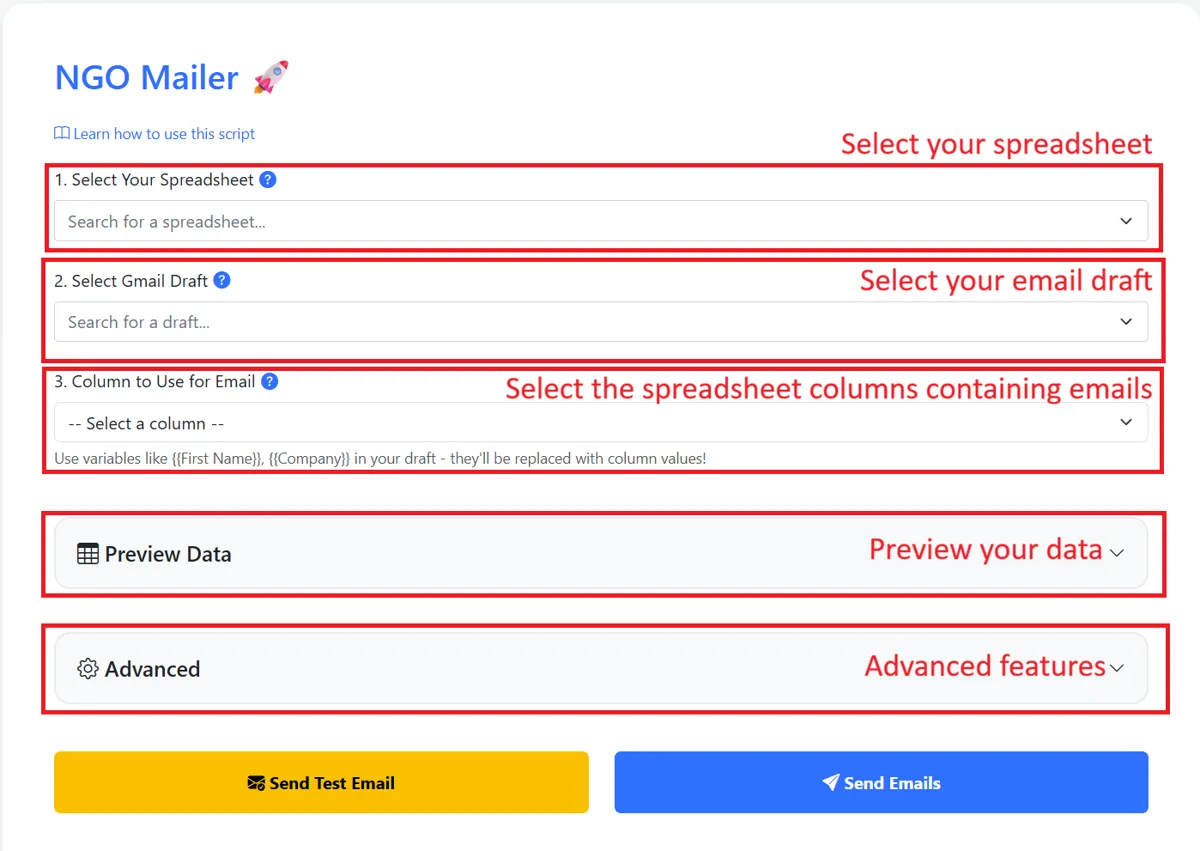
Auto Emailer (called NGO Mailer in the tool) is a free, simple tool for nonprofit teams. It sends one personal email to many people at once, so you do not have to copy and paste a hundred times.
What it does
- Fills in each person's name and details in your email, so every message feels personal.
- Sends from your own Gmail address.
- Writes "sent" or "error" next to each person on your list, so you can see what happened.
- Lets you send a test email to yourself first.
How a team uses it
- Put your list in a Google Sheet, one person per row.
- Write your email in Gmail and save it as a draft. Mark the parts that change, like {{Full Name}}.
- Open the tool and pick your sheet and your draft.
- Send a test email to yourself and check it.
- Click Send Emails.
What you get
- Personal emails sent in minutes instead of hours.
- A clear record of who got the email and any that failed.
- Nothing to install. It works inside your own Google account.